

Bluetooth Keyboards


X7 Floating Magnetic Keyboard Case for iPad Air 11 (2026) / (2025) / (2024) / Air (2022) / (2020) / iPad Pro 11 (2022) / (2021) / (2020) / (2018) with Touchpad - Black

2089D for Microsoft Surface Pro 11 / 10 / 9 / 8 / X Magnetic Adsorption Colorful Light Bluetooth-compatible Wireless Keyboard with Touchpad

Ultra Thin Bluetooth-compatible Keyboard Quiet Typing Wireless Keyboard for Home Office - Black

For Oppo Pad 5 Pro / OnePlus Pad 4 Leather Case + Bluetooth-Compatible Keyboard with Backlight Trackpad - Black

Bluetooth-compatible Keyboard Leather Stand Case for Lenovo Tab M10 Plus - Black

AM22-A For Lenovo Pad Plus / Tab P11 Gen 2 Leather Tablet Case with Touchpad Detachable Keyboard - Pink

2089D Colorful Backlight Bluetooth-compatible Keyboard for Microsoft Surface Pro 11 / 10 / 9 / 8 / X - Black

AM31-AS For Lenovo Tab K11 Gen 2 / Idea Tab / Xiaoxin Pad 11 2025 Leather Case Touchpad Backlit Bluetooth-Compatible Keyboard - Purple

Bluetooth-compatible Keyboard with Touchpad Ultra Thin Wireless Keyboard Foldable Stand Case - Gray

KF 8700 Wireless Bluetooth-Compatible Keyboard Foldable Touchpad Keyboard with Leather Case - Black

B089 Foldable Wireless Bluetooth-Compatible Keyboard with Touchpad for Phones / Tablets / Laptops - Grey

COTECI 64017 Wireless Foldable Bluetooth-compatible Keyboard Portable Keypad Keyboard for Android iOS Windows - Black

Bluetooth-compatible Keyboard with Touchpad + Leather Protective Case Combo Set for Lenovo Tab P11 TB-J606F / Tab P11 5G1 - Black
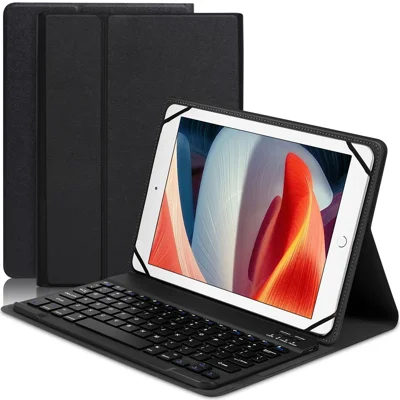
TY3316 Universal 9-11 inch Tablet Protective Cover Bluetooth-compatible Keyboard PU Leather Stand Case - Black

For Lenovo Idea Tab Pro Leather Case with English Ukrainian Bluetooth-Compatible Keyboard with Touchpad


For Huawei MatePad Air (2026) Leather Case + Touchpad Bluetooth-Compatible Keyboard (without Backlit) - Black

Wireless Bluetooth-compatible 3.0 Keyboard Appk78 for iPhone iPad Samsung Smartphone Tablet Laptop - Black

DUX DUCIS For Samsung Galaxy Tab S8 Ultra Keyboard Case Protective Cover Tablet Case Detachable Wireless Bluetooth-compatible Keyboard with Touchpad

B089T 81-Key Tri-Fold Bluetooth-compatible Keyboard with Numeric Keypad Built-in Bracket for Phone Tablet Laptop - Black

B089T 61-Key Triple-Fold Bluetooth-Compatible Keyboard with Touchpad Built-in Bracket for Phone Tablet PC - Black

For OnePlus Pad 3 Pro Leather Case + Bluetooth-Compatible Keyboard with Backlight Trackpad - Black

Wireless Bluetooth-compatible Touch Keyboard + Leather Protective Case Set for Lenovo Tab M10 Plus - Black

OP14 Keyboard for Oppo Pad Neo / Pad Air 2 / OnePlus Pad Go Leather Tablet Case with Bluetooth-compatible Keyboard - Black

For Lenovo Tab Plus Leather Case + Bluetooth-compatible Keyboard with Backlight Trackpad

B023 68-Key Wireless Keyboard Magnetic Folding Bluetooth-compatible Keyboard with Phone Holder Stand - Green

608 Tri-Fold Bluetooth-Compatible Keyboard Dual Channel Aluminum Alloy Keyboard for iOS Android - Rose Gold


For Lenovo Tab M10 Plus (3rd Gen) Leather Stand Tablet Case with Detachable Magnetic Wireless Keyboard (Without Touchpad) - Black

For Samsung Galaxy Tab A 10.1 (2019) T510 / T515 Magnetic Detachable Bluetooth-compatible Keyboard + PU Leather Fine Sheep Lines Tablet Case 2-in-1 - Black

For Lenovo Tab 10.1 (2025) TB311XU2 / Zhaoyang K10C Leather Case + Bluetooth-Compatible Keyboard with Backlight Trackpad

For Samsung Galaxy Tab A 10.1 (2019) SM-T515 SM-T510 Leather Stand Tablet Case with Detachable Magnetic Wireless Keyboard (Without Touchpad) (German Version) - Black

SK-M10 For Lenovo Tab M10 (Gen 3) Leather Tablet Stand Cover + Bluetooth-Compatible Keyboard

GKK For Samsung Galaxy Fold / Z Fold Series Foldable Desk Stand Holder with Bluetooth-compatible Keyboard + Mouse + Stylus - Black

For Lenovo Legion Y900 13 Leather Case + Touchpad Bluetooth-Compatible Keyboard (without Backlit) - Black

Ultra-Slim PU Leather Magnetic Wireless Bluetooth-compatible Keyboard with Trackpad for Microsoft Surface Pro 6 / 5 / 4 / 3 - Dark Grey

Leather Protective Case + Wireless Bluetooth-compatible Touch Keyboard Set for Lenovo Tab P11 Pro - Black

F68 Folding Bluetooth-compatible Keyboard 65 Keys Wireless Keypad for Computer/Tablet/Smartphones


Wholesale Bluetooth Keyboards
Tablets have become part of everyday work, learning, and creative workflows. As users expect more from their devices, Bluetooth keyboards provide a simple way to improve productivity and typing comfort.
For businesses, Bluetooth keyboards are a versatile addition to tablet accessory ranges. They can be offered individually or paired with cases, styluses, and other tablet accessories to create a broader product selection.
Benefits of Bluetooth Keyboards
Wireless connectivity is one of the key advantages of Bluetooth keyboards. Without cables or USB connections, they offer a simpler setup and greater portability for users who need a flexible typing solution.
Features such as quick Bluetooth pairing, multi-device support, and compatibility with major operating systems make them suitable for different devices and customer segments.
Bluetooth Keyboard vs. Wireless Keyboard: Which One Fits Your Market?
| Feature | Bluetooth Keyboard | Wired Keyboard |
|---|---|---|
| Connection | Wireless connection for a cleaner and more flexible setup | Requires a physical cable connection |
| Portability | Lightweight and easier to carry for tablets and mobile use | Better suited for fixed desktop setups |
| Device Compatibility | Works with a wide range of Bluetooth-enabled devices | Usually depends on available ports and connections |
| Best For | Tablets, mobile work, travel, and everyday use | Desktop computers and traditional office setups |
| Market Trend | Growing with the demand for mobile and flexible devices | A stable choice for traditional computer users |
Bluetooth keyboards add more value to tablet accessories by combining portability, simple connectivity, and device compatibility. They help retailers build product ranges that match the way people use tablets today.
At TVCMALL, buyers can source Bluetooth keyboard solutions for various devices. With 95% of products available with no MOQ, businesses can test new products, manage inventory more flexibly, and scale their selection based on market demand.
FAQs
Turn on your Bluetooth keyboard, enable Bluetooth on your device, and select the keyboard from the list of available devices. Once connected, you're ready to start typing.